Discover the latest benefits added to HxDR Reality Cloud Studio. Get more value from your geo data and increase ROI at every stage of your project.
We’ve introduced a suite of advanced capabilities designed to enhance your reality capture workflows and empower your team. Highlights include:
- AI-powered Point Cloud Classification to filter and organize point cloud data for faster, more accurate deliverables
- SiteMap Levels to navigate complex sites with immersive, targeted views that improve visualization and project coordination across all users but especially with non-expert clients and stakeholders
- Enhanced GeoTag workflows to connect assets, add full context, and maximize data value through seamless cross-referencing important and relevant information
- AI-driven processing enhancements for BLK2GO and BLK ARC data that provide high-fidelity visuals to elevate spatial understanding and decision-making
- Customizable settings for shared links, adding new levels of control over data access and presentation.
These updates are built to strengthen complex reality capture workflows, helping teams stay aligned, increase efficiency, make faster, smarter, data-driven decisions. They also ensure your data is more legible and accessible to both end-users and stakeholders.
HxDR Reality Cloud Studio continuously delivers improvements that empower teams to cut rework, sharpen accuracy, and deliver results that drive stronger client and stakeholder outcomes.
AI-Powered Classification for Smarter Data Organization
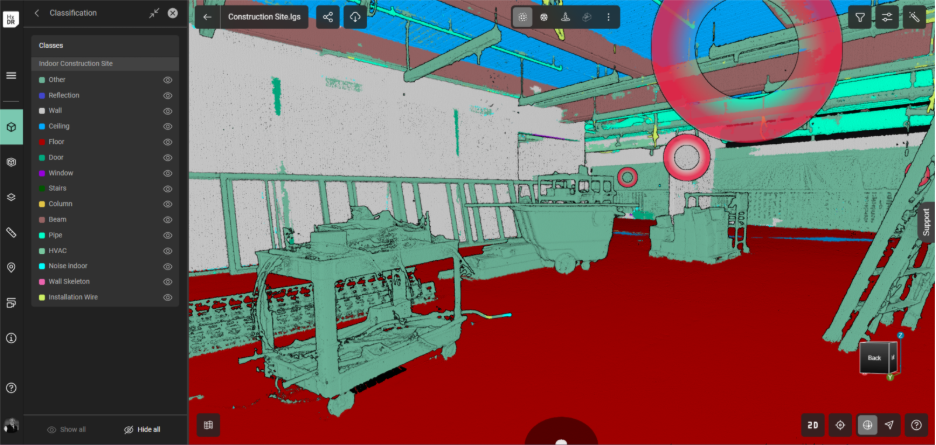
AI-powered classification improves deliverable creation efficiency and accuracy by removing unwanted elements such as construction materials or debris, or objects out-of-scope for a task, resulting in cleaner and more legible point clouds for deliverable creation like model extraction during Scan-to-BIM. Keep team productivity high by running time- and compute-intensive classification in the cloud instead of on local/office IT hardware resources. Maximize access to the results across all team members by freely streaming classified point clouds to Cyclone 3DR and CloudWorx for your Analysis and BIM workflows, ensuring every team member benefits from one cloud-based process.
New capabilities include:
- Efficient Data Filtering: Use AI classification of the point cloud to automatically identify, color-code, and/or hide non-essential elements in Scan-
.
- Streamlined Workflow: Run AI classification in the cloud and stream directly to CloudWorx or Cyclone 3DR with no manual or local file handling
- Optimized Visualization: Get clearer, more accurate Scan-vs-BIM views to make faster, better-informed decisions


SiteMap Levels: Smarter Navigation for Every Project
Experience a more immersive and organized way to explore complex sites with SiteMap Levels, designed to make navigation faster, clearer, and more intuitive.
Key features include:
- Immersive, flexible experience: Navigate sites virtually with ease by eliminating visual clutter and confusion, creating a more logical viewing experience.
- Seamless collaboration: Enable teams to provide clear direction and context, for example, guiding a contractor to “check the electrical panel on the second floor.”
- Efficient documentation: Keep large or complex facilities digitally organized with structured, easily accessible data.
- Faster, targeted exploration: Instantly jump to specific floors or areas instead of manually flying through the space, saving time and improving usability.


Enhanced GeoTag Workflows: Maximize Data Value with Full Context
New GeoTag features help teams identify and categorize assets, connect related information, and maintain organized, context-rich datasets across every project.
Enhancements include:
- Smarter organization: Identify and categorize assets with unlimited and customizable categories per project using the new Category Manager UI. For each Category, choose if it is Free Text or a Predefined List to select from, assign them colors for quick visual cues, and customize the order of listed values.
- Streamlined maintenance and operations: Create GeoTags linked to essential data such as maintenance schedules, operational status, and warranty information to keep teams informed and assets efficiently managed.
- Richer context: Add unlimited file attachments and links (any file format or URL) to each GeoTag and view quantities of each directly in the GeoTag menu or 3D view hover-over cards for quick information summaries.
- Improved integration: Cross-link with Asset and Facility Management applications, with direct integration in Hexagon SDx and SDx2 in progress.
- Enhanced usability: Filter GeoTags by distance or elevation for faster, more targeted navigation.


Maximize Data Value with Rich, Realistic Visualization for BLK2GO and BLK ARC Data
Experience higher-quality, more realistic colorised point clouds that bring every detail to life.
Expanded capabilities include:
- Enhanced detail in colorized point clouds: Delivers immersive, high-quality visualization from BLK2GO and BLK ARC with greater realism.
- Improved color consistency: Produces true-to-life visuals that elevate client engagement and customer presentations.
- Richer, more natural colors: Point clouds now appear sharper, more lifelike, and visually accurate.
- Denser, full-resolution point clouds: Capture and view every point in greater detail for a clearer, more complete representation.

Control How You Share Data with Customizable Link Settings
Easily manage how stakeholders experience shared project data with flexible, secure sharing options tailored to your workflow and project needs.
Key improvements include:
- Set expiration dates for links: Confidently share project data knowing links automatically expire after a user-defined period, with no manual tracking or link management required.
- Set starting views for link visitors: Choose the default view such as panoramic imagery, mesh, or point cloud so every recipient begins their experience in the most relevant context.
- Deliver context-driven access: Ensure stakeholders start with a view that is clear, meaningful, and aligned with their role or objective.

Get a Free Demo
Request your free personalized use case demo today.
HxDR Documents
Access workflows and stay updated with release notes for HxDR Reality Cloud Studio.
Release Notes | Reality Cloud Studio